

@dremmyyyyy
2026-04-06
★★★★★
“No other tweaker I've ever tried worked before except for this one. I used to average 40 FPS with Shaders and Voxy, now I average 120-130 stable.”
via discord
Apply the right Windows tweaks for your hardware, monitor drift over time and recover cleanly if an update or driver undoes the work.
Visible modules
14
matched to your machine
Tweak surface
365-369
depending on GPU
Gaming Mode
9-step
session workflow
Portable EXE · Windows 10 / 11 · Used by 1,000+ players
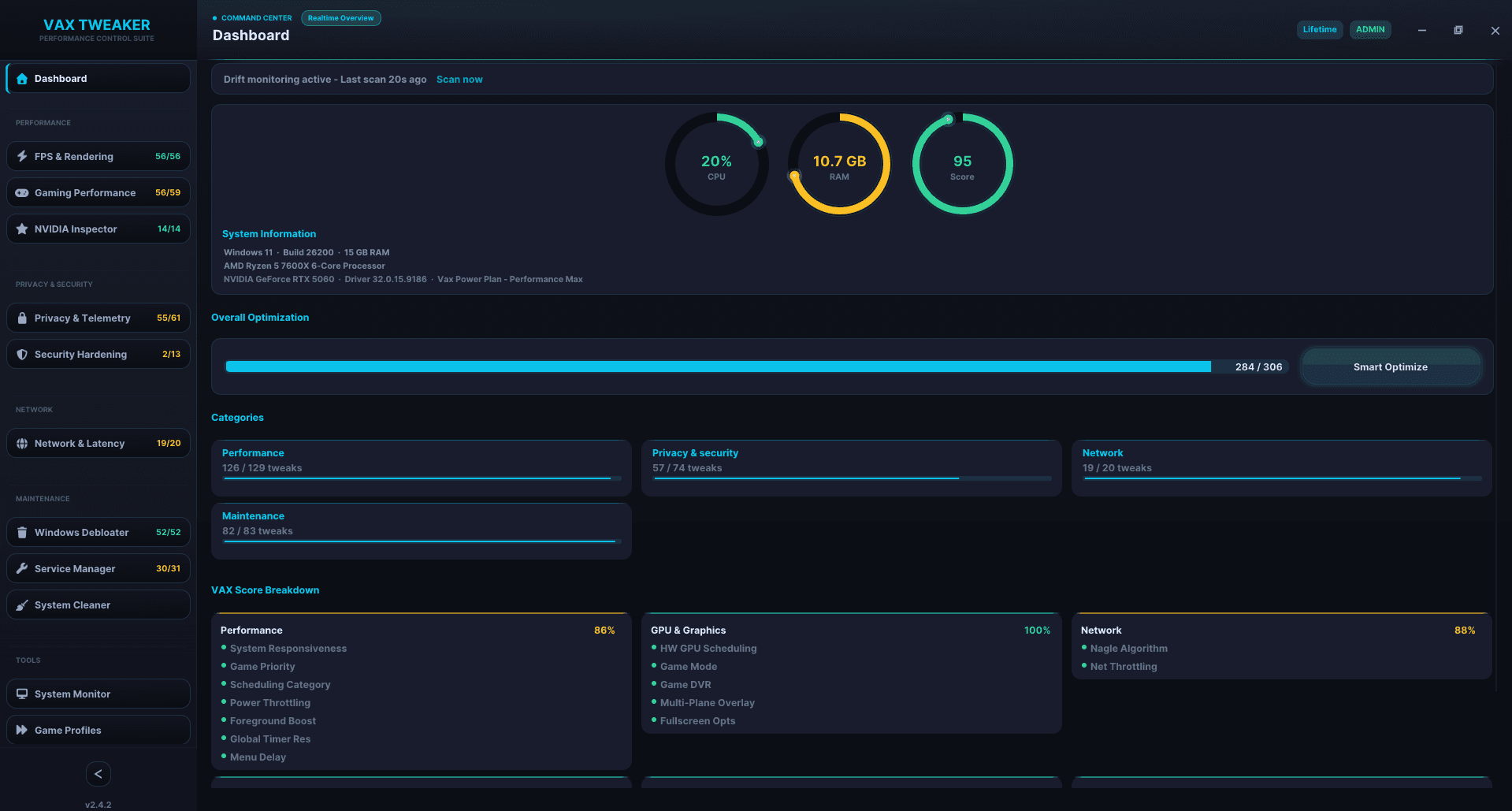
Core Architecture
The app is designed around state, visibility and recovery. The point is not just applying tweaks. The point is knowing what changed, why it changed and how to get back cleanly if needed.
The result is a tweaker that's safe to use as a daily tool. Not a one-time paste-and-forget script. Apply once, watch the system and handle Windows update drift without re-doing everything from scratch.
01
Know exactly what changed
If Windows Update, a driver, or another process silently undoes an applied tweak, Vax flags the exact drift instead of leaving you guessing.
02
Rollback is part of the workflow
Every change is backed up before apply. Failed batches roll back in reverse order, and crash recovery closes the loop after forced restarts.
03
A 9-step session workflow
Not a fake turbo button. Gaming Mode handles processes, RAM, timer resolution, services, network priority, GPU state, notifications and background apps.
04
The right surface for the right machine
AMD and NVIDIA modules auto-select correctly, incompatible tweaks stay hidden and counts reflect your actual system instead of inflated marketing numbers.
Benchmark Lab
Tested on actual machines with hardware disclosed. Not cherry-picked single-run screenshots.
Hardware
Intel Core i5-12400F · NVIDIA RTX 3060 · 16 GB DDR4 3200 MHz
Tested on Windows 11 23H2, stock BIOS, no overclocking. Gaming Mode active.
FPS gain
178 → 247 FPS
Results vary by hardware, game settings and baseline system state.
3 consecutive runs · 180s warmup · CapFrameX 1% low + avg
Pricing
The free build is real. Premium unlocks the full stack: Drift Detection, Gaming Mode, VAX Score, diagnostics and recovery workflows.
Monthly
Secure checkout · Instant key delivery · Cancel anytime
Annual
Save €31.89 vs monthly
Secure checkout · Instant key delivery · Cancel anytime
Lifetime
Pay once, keep forever
Secure checkout · Instant key delivery
Players Say
Hardware disclosed. Use cases vary. The common thread: they kept it installed.
@dremmyyyyy
2026-04-06
“No other tweaker I've ever tried worked before except for this one. I used to average 40 FPS with Shaders and Voxy, now I average 120-130 stable.”
via discord
@tilankyy
2026-04-10
“I am very satisfied. Premium gave me at least 50 more FPS. Very impressive. Highly recommend it.”
via discord
@Ravens
2026-04-05
“The free version helped me more than any paid tweaker I'd bought before. Used Vax on top and got even more FPS. The paid version definitely has more to offer.”
via discord
@schmingis
2026-04-03
“I don't know what magic it does but that paid version fixed my 0.1 frame drops”
via discord
The short version: yes, it is built to be reversible, yes, it stays portable, and no, it doesn’t rely on ban-risk hooks or hidden background services.
FAQ
The important objections, answered without filler.
Yes. Every registry change is backed up before it is applied. You can revert all optimizations with one click from the Restore & Recovery page. No uninstaller, no leftover mess. The batch rollback engine also handles failed runs automatically, reversing any partially applied changes.
Vax Tweaker exclusively modifies Windows system settings: kernel parameters, registry keys, services, power plans and network configuration. It does not modify game files, inject into game processes, or interact with any anti-cheat layer. These are the same types of tweaks covered in public optimization guides. No ban cases have been reported.
Yes, completely. Before applying any tweak, Vax Tweaker stores the original registry value. The Restore & Recovery page lets you create a Windows System Restore point, open the system restore tool directly and roll back all applied Vax tweaks in one action. Crash recovery checkpoints ensure even a forced reboot doesn't leave you in a partial state.
Windows Updates can silently revert some optimizations. Vax Tweaker's Drift Detection scans periodically and notifies you exactly which tweaks changed, so you can reapply them with one click rather than discovering degraded performance later.